
Wizardo Casino App
The application gives you mobile access via a Progressive Web App, without a classic application to download from Google Play or the App Store. Our mobile solution works via Progressive Web App (PWA): open the site from your browser, add the icon to your Home screen, and use the platform like a regular app, without installing APK files or third-party software.
With this setup you can play from a smartphone or tablet without losing access to the main features of the site. From the mobile version you can enter our lobby, access your account, check promotions, participate in missions, monitor the VIP programme, make deposits, and contact our customer support.
To protect your account, always use the official Wizardo casino site. Unofficial apps, APK files downloaded from external portals, or links shared in chats and social media can be risky: they may not belong to our brand, may not be up to date, or could expose your data. For this reason we invite you to install the PWA directly from our site through the browser.
Wizardo casino app features
| Item | What we offer |
|---|---|
| App type | Progressive Web App (PWA) |
| Store download | Not required to use the installed mobile version |
| Android | Installation from the browser via "Add to Home screen" or "Install app" |
| iOS / iPadOS | Installation from Safari via "Share" → "Add to Home" |
| Game access | Slots, live casino, table games, quick games, and titles available in the mobile lobby |
| Promotions | Access to the PROMO section, active bonuses, missions, and offers available on your account |
| Payments | Deposits and withdrawal requests from the Account / Wallet section, based on available methods |
| Account | Login, registration, password recovery, and profile data management |
| Support | Assistance available through the: chat, email. |
Our PWA solution
The mobile version of our casino works directly from the site and can be installed on your device as a PWA. This way the site icon is added to the main screen of your phone, while access remains linked to the official site and the browser.
The experience for you is similar to that of a regular app: you tap the icon, open the platform, log in, and browse games, promotions, cashier, and missions. The difference is that you don't have to download a heavy package, look for manual updates, or install files from external sources.
Why Wizardo uses a PWA
- Quick access: the icon on the Home screen opens the casino without having to type the address in the browser each time.
- No external APK: no need to download files from unofficial sites.
- Mobile compatibility: the PWA works on modern Android devices, iPhones, iPads, and compatible tablets.
- Touch interface: menus, buttons, the lobby, and account sections are adapted to the mobile screen.
- Site-side updates: many changes are handled directly by the site, without reinstalling the app.
How to install the app on Android
 On Android, you can install the PWA from the browser. Generally, Google Chrome shows the option "Add to Home screen" or "Install app" when the site supports this function.
- Open casino from Google Chrome or a PWA-compatible browser.
- Wait for the page to fully load.
- Tap the browser menu, usually indicated by the three dots in the top right corner.
- Select Add to Home screen or Install app.
- Confirm the icon name if prompted.
- Tap Add or Install.
- The app icon will appear on the main screen of the device.
After installation, you can open the platform by tapping the icon. Access to your account, games, and cashier remains linked to your account credentials.
How to install the app on iPhone and iPad
On iPhone and iPad, we recommend installing the PWA from Safari. Other browsers on iOS can open the site, but Safari remains the most stable option for adding the icon to the Home screen.
- Open Safari on your iPhone or iPad.
- Tap the Share icon, i.e. the square with the arrow.
- Scroll through the menu and select Add to Home.
- Check the icon name.
- Tap Add.
- The app icon will be available on the main screen.
From that moment you can open the platform like an app. The PWA still uses the browser engine, so the quality of the experience also depends on your connection, iOS version, Safari settings, and device compatibility.
Browser or PWA: what's the difference
You can use the service both from the browser and from the installed PWA. The main difference concerns the convenience of access. From the browser you need to open Chrome or Safari and reach the site; from the PWA you simply tap the icon on the Home screen.
| Mode | Advantages | When to use it |
|---|---|---|
| Mobile browser | No installation required and allows quick occasional access | When you want to use the site without adding icons to your device |
| Installed PWA | More convenient to open, icon on the Home screen, and an experience more similar to an app | When you often use the site from a smartphone or tablet |
The available features depend on the site and your account, not on whether you open the service from the browser or the PWA. If a section is available in your account, you can normally reach it from mobile too.
What you can do in the app
The PWA is not just for opening our lobby. From the mobile version you can manage most of the gaming experience, from account access to checking promotions.
Main features available on mobile
- Registration: you can create an account by entering your email, password, country, and required details.
- Login: you can access your already registered account using your credentials.
- Password recovery: if you forget your password, you can use the "Forgot your password?" feature from the login screen.
- Game lobby: you can open slots, live games, table games, and other titles available on your profile.
- PROMO section: you can check available offers and read the terms before activating them.
- Missions: you can view active missions, participate, and track your progress.
- VIP: you can monitor loyalty points, progression, and available benefits.
- Wallet: you can access the deposit and withdrawal section, based on available methods.
- Support: you can contact assistance through the channels indicated on the site.
Games available on mobile
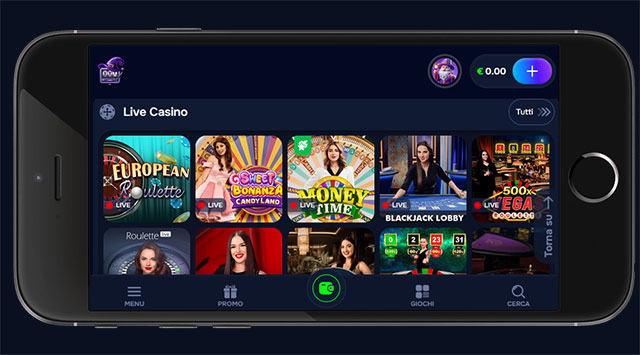 The mobile version lets you access our lobby directly from a smartphone or tablet. Game availability may vary based on country, provider, and your profile, but our mobile experience is designed to cover the main categories of online casino.
- Online slots: games with quick spins, bonus features, Free Spins, jackpots, and special mechanics.
- Live casino: tables with real dealers, such as roulette, blackjack, baccarat, and live formats available in the lobby.
- Table games: digital versions of classic casino games, when available in the selection.
- Instant games: titles with fast rounds and simple rules, if available on your account.
- Jackpot: games linked to jackpot mechanics, when listed in the lobby.
Before playing, we invite you to open the game's info page and read the rules, minimum bet, maximum bet, RTP stated by the provider, and special features. On mobile, this check is particularly useful because the betting buttons may be closer together compared to the desktop version.
Bonuses, missions, and VIP in the Wizardo app
With the PWA you can access the promotional areas of the site, while for the details of each bonus we invite you to consult the dedicated pages. For complete terms, always read the PROMO section, the rules of the individual offer, and the dedicated bonus page.
From mobile you can check:
- bonuses available on your account;
- active offers in the PROMO section;
- any assigned Free Spins;
- daily or weekly missions;
- loyalty points and VIP progression;
- wagering terms, duration, and maximum bet before activation.
This way you can quickly check whether a promotion is compatible with your budget. Before activating any offer, check the minimum deposit, wagering requirements, eligible games, duration, maximum bet, and cashout limits.
Deposits and withdrawals via the app
From the mobile version you can access the Deposit section or the Account → Wallet menu. Here you can choose the available method, enter the amount, and confirm the deposit. The methods shown may change based on your country, currency, and profile.
How to deposit from mobile
- Open the PWA or the mobile site.
- Log in to your account.
- Tap Deposit or go to Account → Wallet.
- Choose the available payment method.
- Enter the amount.
- Fill in the required fields.
- Confirm the payment.
Generally, the deposit is shown quickly in your balance, but any delays may depend on the chosen method or payment checks. If the deposit does not appear, check the transaction status and contact our support.
How to request a withdrawal from mobile
- Open Account.
- Go to Wallet.
- Select the Withdraw tab.
- Choose the available method.
- Enter the amount to withdraw.
- Confirm the request.
Withdrawals may require KYC verification, payment method checks, and completion of any wagering requirements. To avoid blocks or delays, always use methods registered in your name and provide correct personal details.
Security
To use the mobile version safely, install the PWA only from the official site.
Best practices for playing on mobile
- Use a strong password that is different from those used on other sites.
- Do not save credentials on shared devices.
- Avoid public Wi-Fi networks when making payments.
- Always check the domain before logging in.
- Log out of your account if you are using a device that is not your own.
- Do not use VPNs or proxies if casino or country rules do not allow it.
We may request additional verifications to protect your account, check payments, or comply with KYC and AML procedures. These verifications may include identity documents, proof of address, or payment method confirmation.
Problems with the app: what to do
The PWA works via browser, connection, cache, device settings, and site availability. If the app won't install, won't open, or a game won't load, you can try some simple checks before contacting support.
I don't see the "Install app" button
- Check that you have opened the site in the correct browser.
- On Android, try an updated version of Google Chrome.
- On iPhone and iPad, use Safari.
- Wait for the page to fully load.
- Check the browser menu: the option may be called "Add to Home screen".
- If the option does not appear, use the mobile browser version anyway.
The icon opens in the browser
- Remove the icon from the Home screen.
- Open site again in the recommended browser.
- Repeat the installation using the correct menu.
- Check that the operating system is up to date.
The game won't load
- Refresh the page.
- Close and reopen the PWA.
- Try another compatible browser.
- Clear the browser cache and cookies.
- Disable any ad blockers.
- Disable VPN or proxy, if active.
- Check your internet connection.
- If the problem persists, contact customer support.
The deposit does not appear in the balance
- Check whether the payment has been confirmed by the chosen method.
- Wait a few minutes: some systems may take longer.
- Do not repeat the payment immediately if you are unsure of the transaction status.
- Save the receipt, amount, time, and method used.
- Contact support with the transaction details.
For other problems with login, PWA installation, games, deposits, withdrawals, bonuses, or account verification, use live-chat or email. When contacting our support, please provide your account email, device used, browser, description of the problem, and screenshots if available.
Supported devices
You can use Wizardo casino mobile version on various modern devices. The quality of the experience depends on the screen, operating system, browser, available memory, and connection quality.
- Android smartphones: browser access and PWA installation with Chrome or compatible browsers.
- iPhone: browser access and adding to the Home screen via Safari.
- iPad: mobile browsing on a larger screen, useful for live casino and content-rich lobbies.
- Android tablets: a convenient option if you prefer a larger display compared to a smartphone.
- Laptops and PCs: access via the desktop version of the site, without the need for a mobile PWA.
To reduce technical issues, use updated browsers, avoid too many open tabs while playing, and make sure you have a stable connection, especially for live games.
Conclusion
Our application allows quick access to games, account, cashier, promotions, missions, VIP, and support directly from a smartphone or tablet. Once the icon has been added to the Home screen, you can open Wizardo casino like an app quickly and conveniently.
FAQ
Where can I download the Wizardo casino app?
Wizardo casino does not require downloading a classic app from the stores. You can install the PWA version directly from the browser, by adding it to your Home screen.
Is there an official Wizardo casino APK?
The recommended solution for mobile use is the PWA. We invite you to avoid APKs found on external sites, forums, or unverified channels, as they can be risky.
Is Wizardo casino available on Google Play?
To play on Android you do not need to download an app from Google Play. You can open our site with Chrome and install the PWA via "Add to Home screen" or "Install app".
Is Wizardo casino available on the App Store?
On iPhone and iPad you can use Safari and add the site to the Home screen. It is not necessary to install a traditional app from the App Store to access the mobile version.
How do I install Wizardo on Android?
Open casino from Chrome, tap the browser menu, choose "Add to Home screen" or "Install app", and confirm the installation.
How do I install Wizardo on iPhone?
Open site with Safari, tap the Share icon, select "Add to Home", and confirm. The icon will appear on the main screen.
Can I use bonuses and missions from the app?
Yes. From the mobile version you can access the PROMO section, check available offers, view missions, and check VIP points. We invite you to read the full terms before activation.
Can I deposit and withdraw from mobile?
Yes. You can use the Deposit section or Account → Wallet for deposits and withdrawals, based on the methods available on your profile. Withdrawals may require KYC verification.
Why can't I see the "Install app" button?
The name of the option may vary depending on the browser and device. On Android try an updated version of Chrome; on iOS use Safari and look for "Add to Home" in the Share menu.
Does the app take up a lot of space?
The PWA is lighter than a standard native app because it works via browser and website. The space used depends on the device and the data saved by the browser.
Do I need to update the PWA manually?
Usually there is no need to update manually as with a traditional app. Many contents and features are updated on the site side. If something is not working, try closing and reopening the PWA or clearing the cache and cookies.
What do I do if a game won't load?
Refresh the page, check the connection, try another browser, clear cache and cookies, disable VPN or ad blockers, and contact support if the problem persists.